Closing Accounts and Subscriptions After a Death
Subscriptions, memberships and online accounts to cancel, transfer or memorialise, with the monthly cost of whatever is still running.
- Excel
- Works in Google Sheets
Included in The Executor Kit (UK) (£32), with 7 other files.
Instant download. One payment. 14-day refunds.
What this is for
Most people now leave behind a long tail of small accounts: a music service, a newspaper subscription, a phone contract, cloud storage for photos, a gym, a monthly charity gift, a handful of shopping and loyalty accounts. None of them is large, but together they can keep taking money from the estate for months, and some of them hold photos or messages the family will want to keep. This spreadsheet lists them in one place, with what should happen to each and how much is still going out.
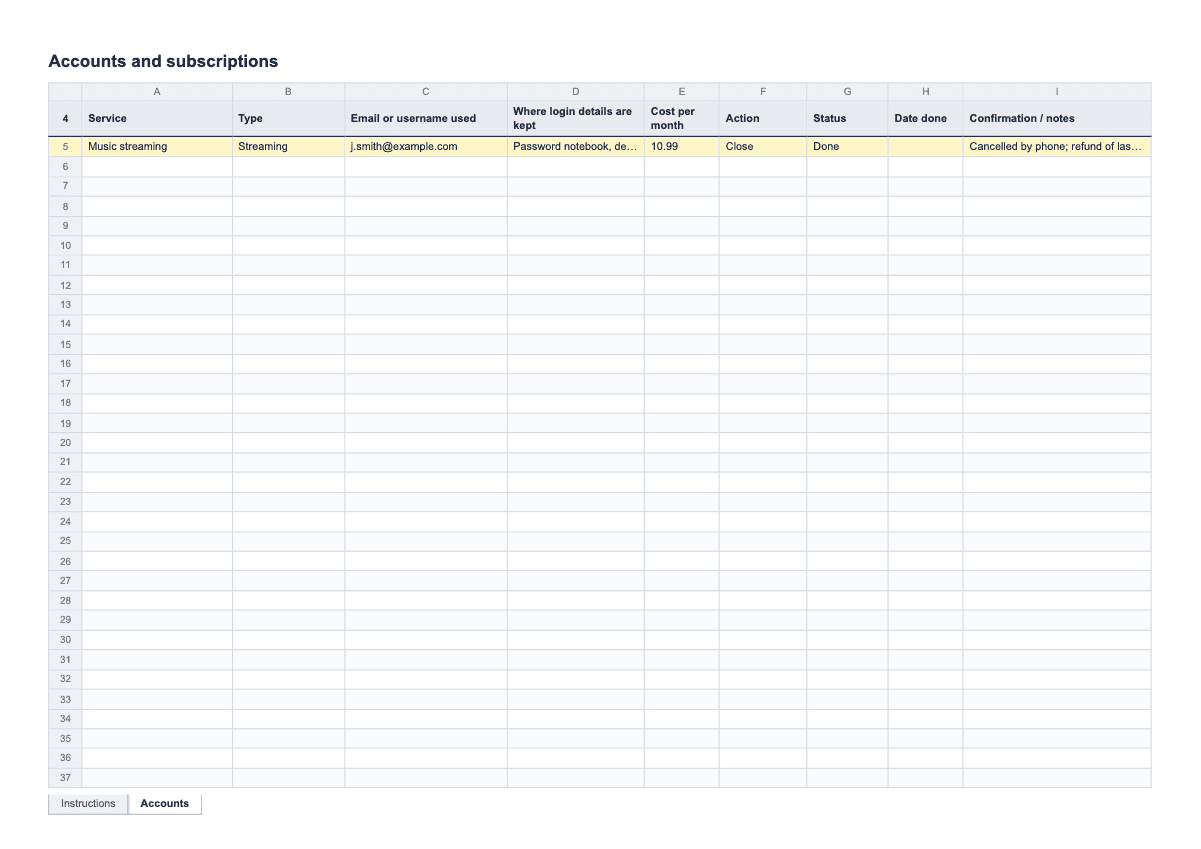
The workbook has a single Accounts tab. Each row is one service, with columns for Service, Type, Email or username used, Where login details are kept, Cost per month, Action, Status, Date done and Confirmation / notes. Type and Action are dropdowns. Action offers Close, Transfer, Memorialise (which some social media sites allow) and Keep for now. At the top, a figure called Still being charged per month adds up the monthly cost of every row not yet marked Done or Not needed, so you can see the total fall as you work through the list.
It is deliberately not a place for passwords. The column says where the login details are kept, such as a password manager or a notebook in a desk drawer, never the details themselves. Share the file with care. Bank accounts, pensions and insurance belong in the assets and debts register; this sheet is for the smaller services around them.
How to fill it in
- Open the workbook, read the short instructions tab, and delete the EXAMPLE row on Accounts before you start.
- Gather the last few months of bank and credit card statements. They are the most reliable way to find subscriptions, because every service that charges money shows up there, including annual ones you may not think of. Go through them line by line and add a row for each regular payment.
- Add the free and online accounts too: email, social media, cloud storage, shopping sites and loyalty schemes. They may not cost anything, but they can hold photos, contacts or credit, and some need closing to protect against misuse.
- For each row, choose a Type from the dropdown and fill in the Email or username used. In Where login details are kept, write only the location, such as "password manager on Mum’s laptop" or "red notebook, bureau". Do not write passwords in the file.
- Enter the Cost per month. For an annual subscription, divide the yearly price by twelve so the total at the top stays meaningful. Leave free accounts blank.
- Choose an Action for each one. Close is for anything no longer needed. Transfer is for accounts someone else will take over, such as a shared broadband contract. Memorialise is for social media profiles the family would like to keep as a memorial where the site offers it. Keep for now is for things that need to stay open until the estate is further along, such as a phone number that banks still use to contact you.
- As you work through the list, set Status to In progress, Waiting or Done, and type the Date done. Write any confirmation number, and the name of the person you dealt with, in Confirmation / notes. Watch the Still being charged per month figure come down.
- If the person received a lot of marketing post, register them with the Bereavement Register, a free service that removes names of people who have died from mailing lists. Record it as a row so it is not done twice. For banks, government departments and utilities, use the who to inform list rather than this sheet.
A filled-in example
| Service | Type | Where login details are kept | Cost per month | Action | Status | Confirmation / notes |
|---|---|---|---|---|---|---|
| Music streaming | Streaming | Password manager, her laptop | £11.99 | Close | Done | Cancelled online 03/05. Confirmation email kept. |
| Mobile phone contract | Phone | Paper bill in the bureau | £18.00 | Keep for now | Waiting | Keeping the number until banks stop texting codes to it. Close in the summer. |
| Photo cloud storage | Cloud storage | Password manager, her laptop | £2.99 | Transfer | In progress | Downloading photos first; then moving the plan to Gareth. |
| Monthly charity gift | Charity donation | Bank statement only | £10.00 | Close | Done | Rang the charity 06/05. They sent a kind letter. |
| Online magazine | Magazine / newspaper | Red notebook, desk | £6.50 | Close | Done | Cancelled 04/05 but charged again 01/06. Rang again, ref 55812; refund promised. Checked the July statement: refunded. |
Common mistakes
- Writing passwords in the spreadsheet. If the file is shared or lost, every account on it is exposed. Note only where the details are kept.
- Closing an email or cloud account before saving what is in it. Photos, contacts and old messages may be lost for good once an account is deleted. Download first, then close.
- Closing a joint account or a shared contract by mistake. A household broadband contract or a joint bank account may still be needed by the person living there. Check who else relies on it before choosing Close.
- Not checking the next statement. Some cancellations do not go through the first time. Look at the following month’s statement and follow up any charge that reappears.
- Keeping no record of the call. A confirmation number and a date make it much easier to get a refund when a charge continues after cancellation.
What the rules say
The Bereavement Register is a free service that removes the names and addresses of people who have died from mailing lists.
Source: nidirect, Junk mail, spam and unwanted phone callsBeing reviewed
Last reviewed 29 September 2026. We link to official sources; your local rules may differ, so check them.
Questions
- How do I cancel direct debits after a death?
- Tell the bank about the death and ask which regular payments are still set up on the person’s accounts. You can also contact each company directly to close or transfer the service. Add each one to this sheet so you can check it has stopped on the next statement.
- How do I find all their subscriptions?
- Start with several months of bank and card statements, then look through their email inbox for receipts and renewal notices, and check any app store account on their phone. Post that keeps arriving is another good clue.
- What happens to social media accounts when someone dies?
- It depends on the site. Some let a family member ask for the profile to be memorialised, which keeps it visible but locked; others only offer closure. Each site has a help page explaining its own process and the proof it asks for.
- Can I stop junk mail addressed to them?
- Yes. The Bereavement Register is a free service that removes the names and addresses of people who have died from mailing lists. It can take a little while for post to reduce.
- Should I use a letter or a phone call?
- Most subscriptions can be cancelled online or by phone. Where a company asks for something in writing, the bereavement notification letters give you a starting point you can adapt.