Maintenance Request Form and Repair Log
A one-page request form for tenants and a repair log that tracks each job from report to done, with days open and costs.
- PDF · Letter
- Excel
- Works in Google Sheets
Included in The Landlord Kit ($29), with 7 other files.
Instant download. One payment. 14-day refunds.
What this is for
Repair requests arrive by text at 11 p.m., in a hallway conversation, on a sticky note under the door. Half of them are forgotten by the landlord and the other half are remembered differently by the tenant. A written request form and a log that follows each job from the first report to "fixed" give both sides the same version of events: what was wrong, when you heard about it, when someone came, and what it cost.
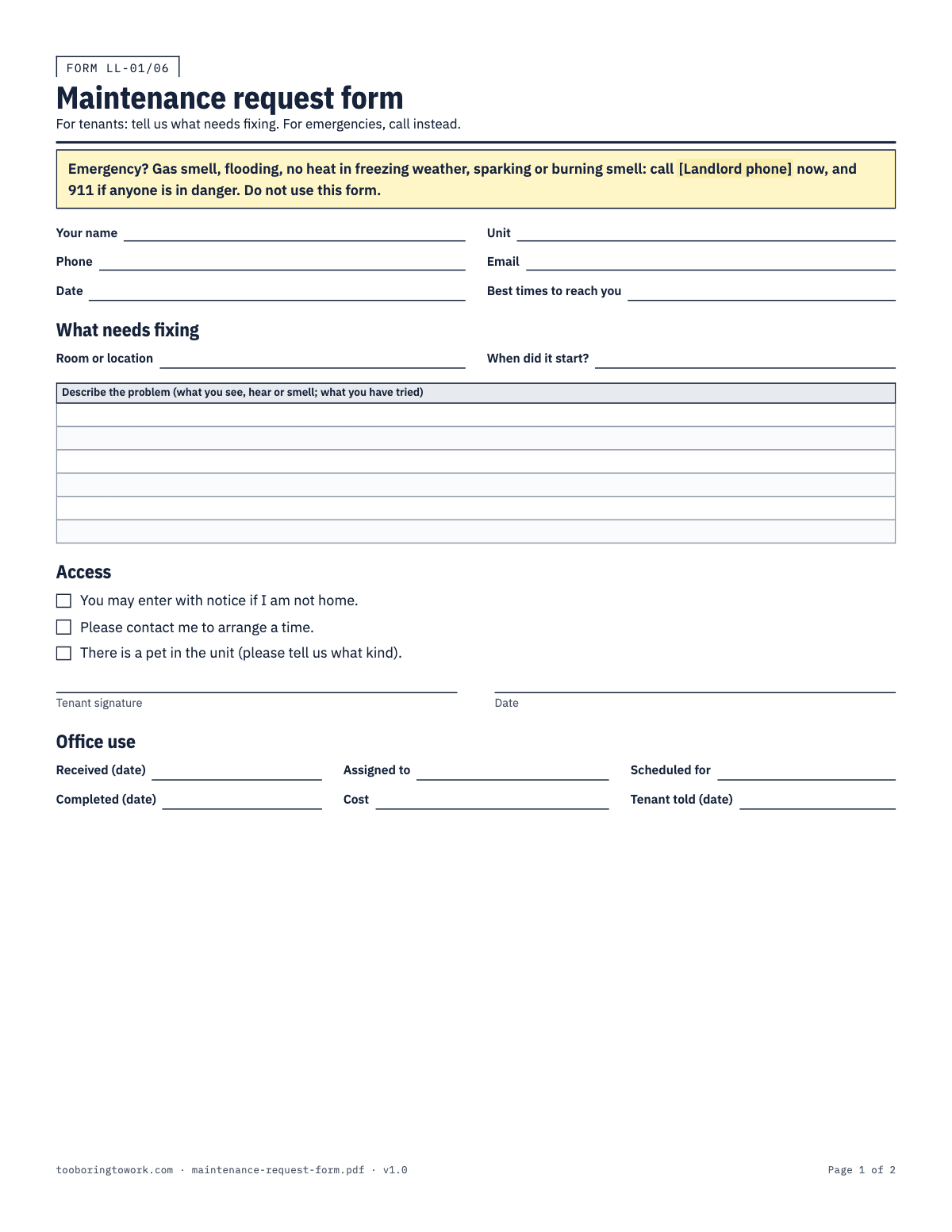
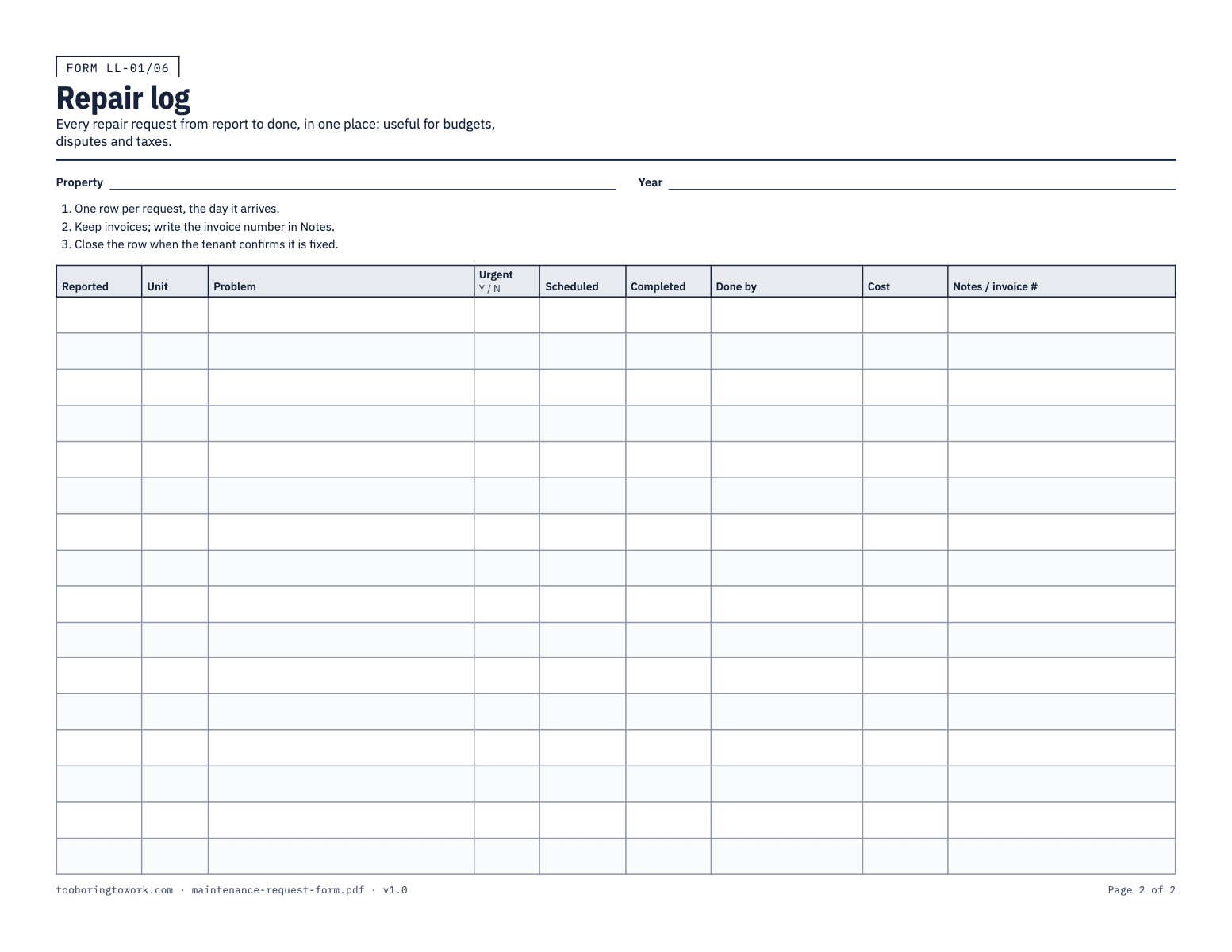
The PDF has two pages. The maintenance request form is for tenants. It opens with an emergency box telling them to call, not write, for a gas smell, flooding, no heat in freezing weather or sparks, and 911 if anyone is in danger. Below that are the tenant’s contact details, the room or location, when the problem started, a large box to describe it, and an access section: permission to enter with notice, a request to arrange a time, and a note about pets. An office-use strip at the bottom records when you received it, who it was assigned to, when it was scheduled and completed, the cost, and when the tenant was told. The second page is a repair log with one row per request: Reported, Unit, Problem, Urgent, Scheduled, Completed, Done by, Cost and Notes / invoice #.
The Excel version turns the log into a working list. Each row has a Status dropdown (Open, Scheduled, Waiting on parts, Done) and a Days open column that counts itself: days since the report while the job is open, and the total once it is complete. An open job older than the limit on the Settings tab, seven days to start with, turns amber, and an urgent job that is not done shows red. The total repair cost for the year sits at the top of the Log tab.
How to fill it in
- Print the request form and give a few copies to each tenant at move-in, or email the PDF so they can print or fill it in. Write your phone number in the emergency box first; the blank there is the one that matters most.
- Tell tenants the form is the normal way to ask for repairs, and that emergencies are a phone call. A text or email is fine too, as long as it ends up on the log.
- When a request comes in, however it arrives, fill in the office-use strip with the Received date, and add a row to the log the same day: Reported, Unit, a short Problem description, and Urgent Y or N.
- In the Excel log, set Status to Open. Days open starts counting from the Reported date. Answer the tenant quickly, ideally within a day or two, even if it is only to say when someone can come.
- Check the access section before anyone goes in. If the tenant ticked "Please contact me to arrange a time", call first. Either way, give whatever notice your state and local rules require for entry; the notice of entry letter is set up for that.
- As the job moves, update Status to Scheduled or Waiting on parts, and fill in the Scheduled date on the paper form. Whoever does the work goes in Done by, whether that is you, a handyman or a company.
- When the tenant confirms the problem is fixed, fill in Completed and Cost, set Status to Done, and write the invoice number in Notes / invoice #. Days open then stops counting and shows the total time the job took.
- Copy each repair cost into your rental income and expense tracker. Large jobs, like a new water heater rather than a new valve, may be improvements rather than repairs for tax purposes: the IRS says repairs can generally be deducted, but improvements must be capitalized and depreciated. Mark those in Notes for your tax preparer.
A filled-in example
| Reported | Unit | Problem | Urgent | Status | Completed | Days open | Done by | Cost | Notes / invoice # |
|---|---|---|---|---|---|---|---|---|---|
| 02/09/2026 | Unit A | Kitchen sink dripping under cabinet | N | Done | 02/12/2026 | 3 | A-1 Plumbing | $185.00 | Invoice 2291; tenant confirmed fixed. |
| 02/27/2026 | Unit B | No heat, thermostat blank | Y | Done | 02/27/2026 | 0 | R. Heating Co. | $140.00 | Called in at 7 a.m.; fixed same day. Invoice 118. |
| 03/06/2026 | Unit B | Dryer vent flap stuck open, cold air | N | Waiting on parts | 14 | Owner | Part ordered 03/08; tenant updated 03/15. | ||
| 03/18/2026 | Unit A | Bathroom fan noisy | N | Scheduled | 2 | Owner | Tenant asked to arrange time; set for 03/21. |
Common mistakes
- Letting requests live in your text messages. Texts get buried, and nobody can total them at tax time. Whatever channel it arrives on, it goes on the log the same day.
- Going quiet while waiting for a contractor. Tenants are far more patient with "the part arrives Thursday" than with silence. Update them when the Status changes and note the date you did.
- Entering without checking the access section or giving notice. Even for a repair the tenant asked for, entry rules may still apply. Check your state and local rules and use a written notice when in doubt.
- Closing the row when the worker leaves rather than when the tenant confirms. A leak that comes back two days later is the same job, not a new one. Wait for a yes, then mark it Done.
- Skipping the Cost column on jobs you did yourself. Write down materials and a short description. The receipts belong in the tracker, and the pattern of small jobs tells you when something needs replacing.
What the rules say
Repair and maintenance costs for a rental can generally be deducted; improvements must be capitalized and depreciated (IRS Publication 527).
Source: IRS Publication 527, Repairs and ImprovementsBeing reviewed
Last reviewed September 29, 2026. We link to official sources; your local rules may differ, so check them.
Questions
- What should a tenant maintenance request form include?
- The tenant’s name, unit and contact details, where the problem is, when it started, a description, and whether you may enter. A clear emergency instruction at the top matters too, so nobody fills in a form while water pours through the ceiling. This form also has an office-use strip for your dates and costs.
- How quickly should a landlord respond to a repair request?
- Emergencies need an immediate response. For everything else, answering within a day or two, even just to schedule, is sound practice. Your state or city may set its own deadlines for some repairs, so check your state and local rules. The Excel log’s Days open column and amber flag show which jobs have been waiting too long.
- What counts as an emergency repair?
- The form lists the usual ones: a gas smell, flooding, no heat in freezing weather, and sparking or a burning smell. Anything that puts people in danger or will cause serious damage within hours belongs on the phone, not on paper. Tell tenants that clearly at move-in.
- Can I change the seven-day flag in the Excel log?
- Yes. On the Settings tab, change "Flag open requests after this many days" to whatever suits you. Open jobs with more Days open than that turn amber. Urgent jobs that are not Done show red regardless of the limit.
- Why keep a repair log at all?
- Three reasons: disputes, budgets and taxes. It shows that you responded, and how quickly. It shows which appliance keeps failing. And its costs go straight into your records for Schedule E, with the invoice numbers attached.
- Should tenants sign the request form?
- It helps, especially the access section, because it records what the tenant agreed to about entry. A request made by phone or text is still a request: fill in the log anyway and keep the message. Tenant permission does not replace any notice your state requires.