Rent Ledger Template for Small Landlords
Every rent payment for up to four units in one spreadsheet, with days late, late fees from your lease and yearly totals per unit.
- Excel
- Works in Google Sheets
Free · Excel
What this is for
A bank statement tells you money arrived. It does not tell you which unit it was for, which month it covered, whether it was late, or that the tenant in Unit B has been $75 short since March. A rent ledger does. It is one row per payment, entered the day the money lands, and it is the record you reach for when a tenant says they paid on the 3rd, when you write a reference for a good tenant, or when you sit down to do your taxes and need twelve months of rent per unit. It also settles quieter questions, like whether a tenant who seems reliable has actually been drifting later each quarter, or whether a vacancy in July cost you one month or two.
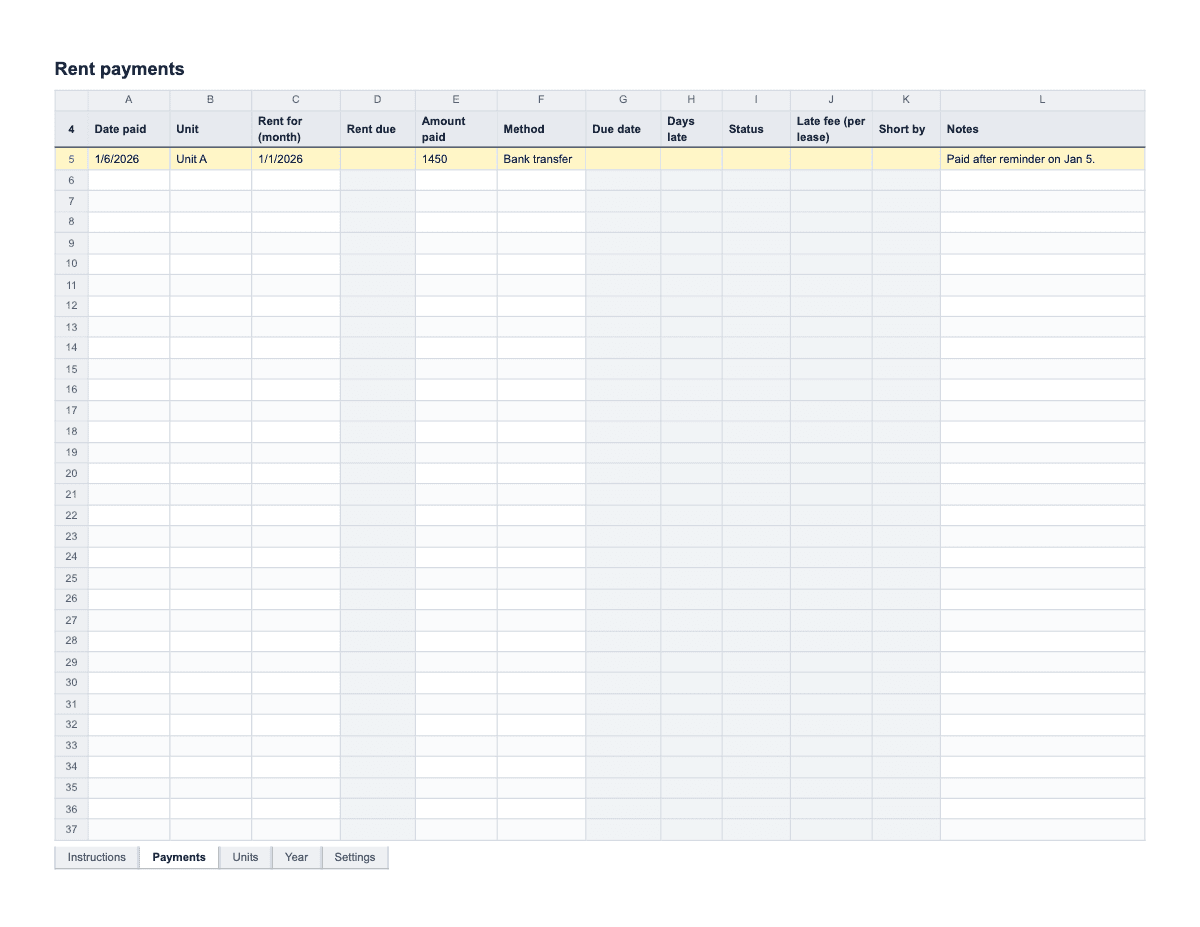
This ledger is an Excel workbook for up to four units, with four tabs. Units holds the lease terms for each unit: tenant, monthly rent, the day rent is due, grace days and the late fee in your lease. Payments is where you type each payment; the rent due, due date, days late, Status, late fee and Short by amount fill themselves in from the Units tab. Year totals what each unit paid in every month of the year, and compares it with twelve months of full rent in the Difference column. Settings holds the year the Year tab reports on.
The workbook does not decide your late fee or grace period. Those come from your lease, and late fees and grace periods are limited by law in many states and cities, so check your state and local rules and type in the terms you are actually allowed to charge. The file opens in Excel, Google Sheets, Numbers and LibreOffice. Formula columns are locked against accidental typing, with no password, so you can unprotect them if you need to change something.
How to fill it in
- Open the Units tab and fill in one row per unit: a short name in Unit (Unit A, Upstairs, 12B), the Tenant(s), Monthly rent, the Due day (1–28), Grace days and Late fee, all copied from the lease. The ledger allows due days up to the 28th so every month has one.
- Open Settings and type the year you want the Year tab to show. Change it in January; last year’s payments stay on the Payments tab and reappear on the Year tab if you type the old year back in.
- Delete the EXAMPLE row on the Payments tab before entering real payments. Left in, it adds a phantom $1,450 to Unit A in January and throws off the first Difference you look at.
- Each time rent arrives, add a row on Payments: Date paid, Unit from the dropdown, Rent for (month), Amount paid and Method. For "Rent for", type any date in the month the payment covers; the sheet only uses the month and year.
- Check the formula columns on that row. Rent due and Due date come from the Units tab. Days late counts the days between the due date and the date paid. Status shows LATE, in red, when that number is more than the grace days, and Late fee (per lease) shows the fee from the Units tab.
- If a tenant pays in parts, enter each part as its own row with the same Rent for month. Short by shows how much less than the full rent each row was, in amber; the Year tab adds the parts together, so the month is only short there if the parts do not add up.
- Use Notes for anything you would want to remember in a dispute: "paid after reminder on Jan 5", "check #1043", "agreed to pay balance on the 20th". If a payment is late, the landlord letter templates include a plain late rent reminder.
- Collect late fees as a separate row only if you want them in the ledger, and mark them clearly in Notes; otherwise track the fee there and bill it apart from rent. Either way, be consistent, because a fee typed as rent confuses the Short by and Difference columns for that month.
- Once a month, look at the Year tab. Each unit’s Year total sits next to its Full rent, and a negative Difference turns amber. At tax time, the year totals go into your rental income and expense tracker or straight to whoever prepares your return.
A filled-in example
| Date paid | Unit | Rent for (month) | Rent due | Amount paid | Days late | Status | Late fee (per lease) | Short by | Notes |
|---|---|---|---|---|---|---|---|---|---|
| 01/02/2026 | Unit A | Jan 2026 | $1,450.00 | $1,450.00 | 1 | On time | $0.00 | ||
| 01/05/2026 | Unit B | Jan 2026 | $1,275.00 | $1,200.00 | 4 | On time | $75.00 | Said balance comes with Feb rent. | |
| 02/09/2026 | Unit A | Feb 2026 | $1,450.00 | $1,450.00 | 8 | LATE | $50.00 | $0.00 | Reminder sent 02/07. Late fee billed separately. |
| 02/03/2026 | Unit B | Feb 2026 | $1,275.00 | $1,350.00 | 2 | On time | $0.00 | Includes $75 January balance; Year tab evens out. |
Common mistakes
- Recording rent against the month it arrived instead of the month it covers. January rent paid on December 29 belongs to January in the ledger. Fill in "Rent for" every time and the Year tab sorts it out.
- Typing a late fee that your lease does not include, or that your state or city does not allow. The sheet only repeats what you put on the Units tab. Check your lease and your local rules first.
- Entering a month’s payments from memory at the end of the month. The Date paid is the one number a tenant is most likely to argue with. Enter it the day the money arrives, with the check number or transfer reference in Notes.
- Keeping the ledger in a notebook in the car, a phone app and a spreadsheet at once. Three partial records are worse than one complete one, because each contradicts the others. Pick this file, save it somewhere backed up, and make it the only place rent gets written down.
- Mixing the security deposit into the rent rows. A deposit you expect to return is not rent. Keep it out of the ledger, or note it in its own row with the unit and a clear note, so it does not inflate the Year total.
What the rules say
Rent received in advance is rental income in the year you receive it, whatever period it covers (IRS Publication 527).
Source: IRS Publication 527, Advance rentBeing reviewed
The IRS says to keep tax records for 3 years in most cases, longer in some situations, and to keep property records until the period ends for the year you sell the property.
Source: IRS, How long should I keep records?Being reviewed
Last reviewed September 29, 2026. We link to official sources; your local rules may differ, so check them.
Questions
- What is a rent ledger, and do I need one?
- A rent ledger is a dated list of every rent payment by unit: what was due, what was paid, when, and how. You need one the first time a tenant disputes a payment or you have to show your rental income. Bank records help, but they do not show which month or unit a payment was for.
- How do I record a partial rent payment?
- Enter each part as a separate row on the Payments tab, with the same unit and the same Rent for month. Each row shows its own Short by amount, and the Year tab adds the parts together for the month. Write in Notes what the tenant said about the balance.
- Does the ledger calculate late fees automatically?
- Yes, from the numbers you enter on the Units tab. If a payment arrives more than the grace days after the due date, Status shows LATE and the late fee from the lease appears. Late fees and grace periods are limited in many states and cities, so the sheet uses only your terms and cannot check them against the law.
- How do I handle rent paid in advance?
- Enter it with the month it covers in Rent for, one row per month if it covers several. For taxes, the IRS treats rent received in advance as income in the year you receive it, whatever period it covers. Your ledger shows the months it covers; your tax records should show the year it arrived.
- How long should I keep rent records?
- The IRS says to keep tax records for 3 years in most cases, longer in some situations. Rent ledgers also matter in tenant disputes and references, so many landlords keep every year’s file for as long as they own the property. One workbook per year, saved with the year in the file name, keeps that simple.
- Can I use this rent ledger in Google Sheets?
- Yes. Upload the file to Google Drive, open it, and choose File, then Save as Google Sheets. The dropdowns, formulas and red and amber flags work there too. Sheet protection may behave a little differently than in Excel. Numbers on a Mac and LibreOffice Calc open the file directly, with no conversion step.