Food Hygiene Training Record for Staff
One row per member of staff: induction, certificate level and date, refresher due date and each hygiene topic covered.
- PDF · A4
- Excel
- Works in Google Sheets
Included in The Kitchen Log Kit (UK) (£19), with 8 other files.
Instant download. One payment. 14-day refunds.
What this is for
A lot of small food businesses believe the law says every member of staff must hold a Level 2 food hygiene certificate. It does not. What the law says is that food handlers must be supervised and instructed or trained in food hygiene to suit the work they do, and that a certificate, while useful, is not compulsory. The catch is the second half of that rule: you have to be able to show the training was adequate. When an environmental health officer asks how the new kitchen porter knows to wash their hands after taking the bins out, "we told him" is a weaker answer than a dated row with a supervisor's initials on it.
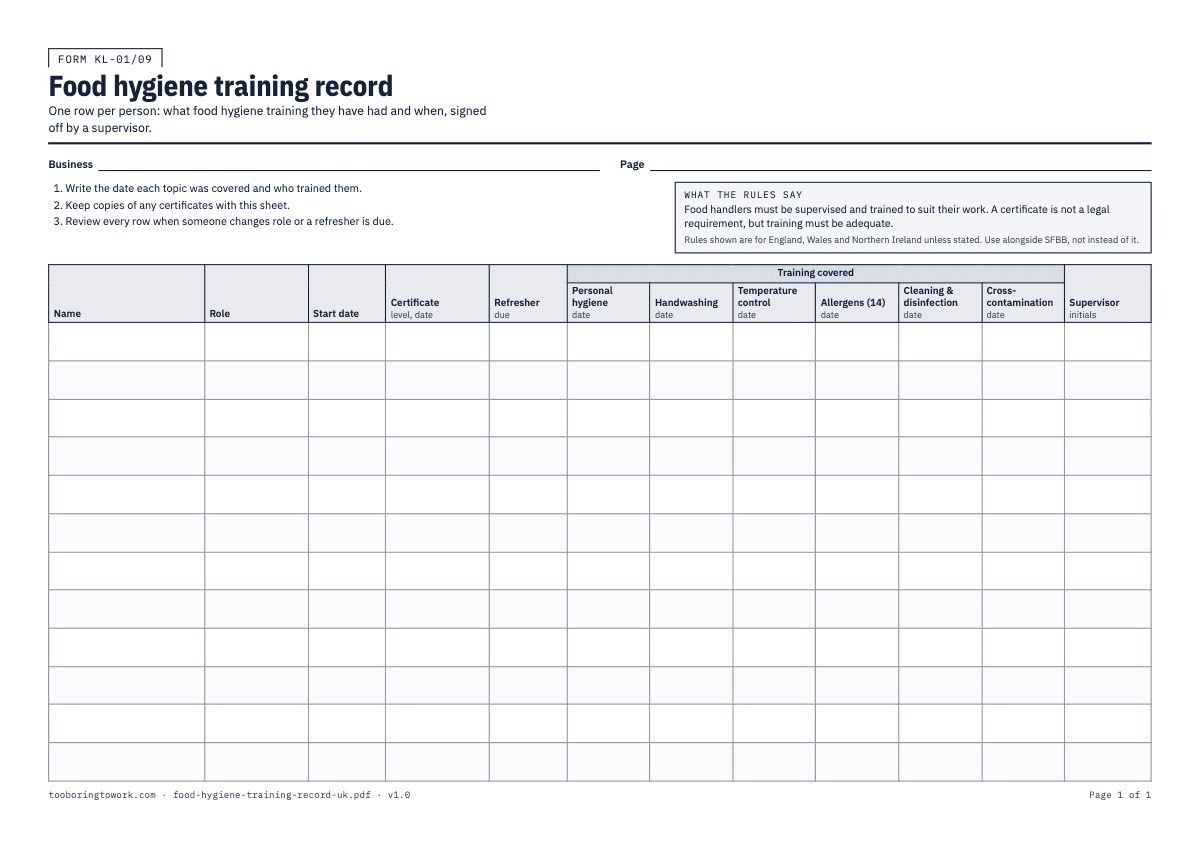
This record gives each person one row. The A4 sheet is landscape with 12 rows and columns for Name, Role, Start date, Certificate (level and date), Refresher due, then a block headed Training covered with a date column for each of six topics: Personal hygiene, Handwashing, Temperature control, Allergens (14), Cleaning & disinfection and Cross-contamination. The last column is for the Supervisor's initials. Copies of any certificates are kept with the sheet. It supports the training side of your HACCP-based procedures and sits alongside Safer Food, Better Business; it does not stand in for either.
The Excel version adds the arithmetic. On the Staff tab you choose a certificate level from a dropdown (Level 1 to Level 4, or None) and enter the certificate date, and the Refresher due column works out a date by adding the number of years set on the Settings tab. That interval starts at 3 and is your own policy, not a legal deadline, so change it to whatever your business has decided. A Status column then reads REFRESHER DUE once that date has passed, TRAINING DUE while any of the six topic dates is still empty, and OK when neither applies.
How to fill it in
- Fill in the business name and page number at the top. Start a row for every person who handles food or works in the kitchen, including part-timers, weekend staff and the owner. Write their Name, Role and Start date.
- Induction comes first. On or before a new starter's first shift, go through the basics that matter from minute one: when and how to wash hands, reporting illness, clean clothing, and where the allergen information lives. Write the date in the Personal hygiene and Handwashing columns and initial the Supervisor column.
- Cover the remaining topics as the person starts doing the related work, using your own kitchen as the example: the probe, the fridges, the colour-coded boards, the disinfectant and its contact time, the allergen matrix and how to answer a customer. Write the date in each topic column once it is done. Showing someone, then watching them do it, counts for more than handing them a leaflet.
- If the person has a food hygiene certificate, write the level and the date on it in the Certificate column and keep a copy behind the sheet. If they have none, write "none". That is allowed, as long as the training in the topic columns is suitable for what they do.
- In the Refresher due column, write the date your policy says they should be retrained or recertificated. In the Excel file this is calculated for you from the certificate date and the interval on the Settings tab. On paper, work it out once and write it in.
- In the Excel file, check the Status column whenever you update the sheet. REFRESHER DUE is shaded as a problem; TRAINING DUE is shaded as a warning. Book the course or run the session, then update the dates so the row goes back to OK.
- Review each row when someone changes role (a kitchen assistant who starts cooking needs more than they had), when a procedure changes, or after something goes wrong. Add the date of any retraining in the relevant topic column.
- When someone leaves, keep their row. Draw a line through it or move it to the bottom with a leaving date. Delete the EXAMPLE row in the Excel file before you begin.
A filled-in example
| Name | Role | Start date | Certificate (level, date) | Refresher due | Handwashing | Allergens (14) | Temperature control | Status | Supervisor |
|---|---|---|---|---|---|---|---|---|---|
| Lena H | Head chef | 04/03/2021 | Level 3, 18/01/2025 | 18/01/2028 | 04/03/2021 | 10/03/2021 | 10/03/2021 | OK | Owner |
| Dan O | Chef de partie | 15/05/2023 | Level 2, 22/05/2023 | 22/05/2026 | 15/05/2023 | 19/05/2023 | 19/05/2023 | REFRESHER DUE | LH |
| Tom W | Kitchen porter | 02/06/2025 | None | 02/06/2025 | 09/06/2025 | 16/06/2025 | OK | LH | |
| Priya S | Front of house | 21/09/2026 | None | 21/09/2026 | TRAINING DUE | LH |
Common mistakes
- Treating a certificate as the whole story. An online Level 2 course teaches general principles; it does not tell someone where your probe wipes are, which board is for raw meat or how your allergen matrix works. The topic columns are for that local training.
- Only recording people with certificates. The weekend washer-up and the owner who covers lunch both handle food, and both need a row.
- Filling in every topic on the first day. A row with six identical dates suggests a signature, not training. Spread it out as the person actually learns each part of the job.
- Setting the refresher interval once and forgetting what it means. The number on the Settings tab is your policy. If you change it, make sure the people who book courses know.
- Losing the evidence behind the dates. Keep certificate copies, and a line or two in your own diary or on the back of the sheet about what an in-house session covered, so the date means something if someone asks.
What the rules say
Food handlers must be supervised and instructed or trained in food hygiene to suit their work. A food hygiene certificate is not a legal requirement, but you must be able to show the training was adequate.
Source: Regulation (EC) No 852/2004 (retained), Annex II Chapter XIIBeing reviewed
Food businesses must have food safety procedures based on HACCP principles, keep them up to date, and keep records for an appropriate period (Regulation 852/2004, Article 5).
Source: Regulation (EC) No 852/2004 (retained), Article 5Being reviewed
Last reviewed 29 September 2026. We link to official sources; your local rules may differ, so check them.
Questions
- Is a Level 2 food hygiene certificate a legal requirement?
- No. The law requires that food handlers are supervised and instructed or trained in food hygiene to suit their work, and a certificate is not compulsory. You must be able to show the training was adequate, which is what this record is for. Many businesses still choose Level 2 for food handlers because it is an easy way to cover the basics.
- How often does food hygiene training need to be refreshed?
- The law does not set a refresher interval. Many businesses pick one as a matter of policy, often every few years, and some course providers suggest one too. The Excel file uses a number on the Settings tab so you can set your own; it starts at 3 years.
- What should a staff food hygiene training record include?
- At minimum, who was trained, in what, when and by whom. This sheet records name, role, start date, any certificate level and date, a refresher date, the date each of six hygiene topics was covered and a supervisor's initials. Keep copies of certificates with it.
- Does in-house training count?
- Yes, if it is suitable for the job the person does and you can show it happened. Record the date and topic, and keep a note of what was covered. Training on your own kitchen's procedures is often more useful day to day than a general course, and the two work well together.
- Will an EHO ask to see training records?
- They may ask how staff were trained, especially if they see something that suggests they were not. A current record that matches what staff can tell them in person is the strongest answer. Keep it with your SFBB pack so it can be found quickly.