Food Safety Training Record for Staff
One row per employee: training topics with dates, food handler card and CFPM expiry dates, and who did the training.
- PDF · Letter
- Excel
- Works in Google Sheets
Included in The Kitchen Log Kit ($24), with 8 other files.
Instant download. One payment. 14-day refunds.
What this is for
Kitchens train people constantly and record it almost never. A new dishwasher gets shown the three-compartment sink by whoever is on, a line cook learns the allergen routine by watching, and the manager's certificate is in a drawer somewhere, possibly expired. Then an inspector asks who the person in charge is today and whether they are certified, or a guest has a reaction and someone asks what the server was taught about allergens. A food safety training record answers those questions in one place: who works here, what they were trained on and when, and when their cards run out.
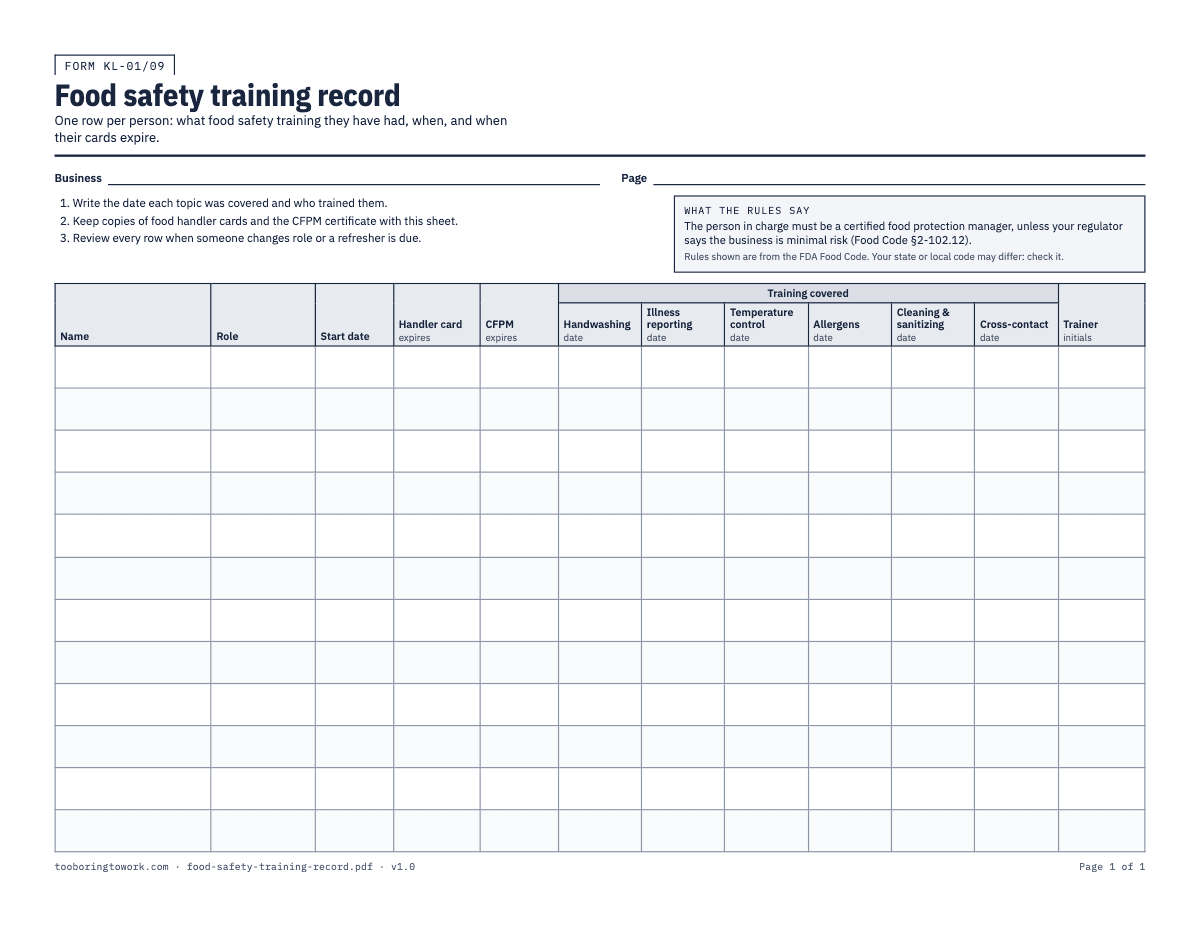
The printed sheet is landscape letter with twelve rows, one per employee. Each row has Name, Role and Start date, then two expiry dates: the food handler card and the CFPM (certified food protection manager) certificate. Six topic columns under "Training covered" take the date each subject was taught: Handwashing, Illness reporting, Temperature control, Allergens, Cleaning & sanitizing and Cross-contact. The last column is the Trainer's initials. The rules box prints the Food Code requirement that the person in charge be a certified food protection manager, unless your regulator treats the business as minimal risk.
The Excel version is where the record earns its keep. The Staff tab has the same columns and adds a Status column that reads the dates for you. It shows EXPIRED when a card or certificate date has passed, RENEW SOON when one is due within the number of days set on the Settings tab (60 to start with), and TRAINING DUE when any topic has no date yet. Everything else shows OK. Scan down that one column and the list of people to chase is in front of you.
How to fill it in
- Add every person who handles food, including dishwashers, bussers who plate desserts, and part-time weekend staff. Fill in Name, Role and Start date. On the printed sheet, write the business name and a page number at the top.
- Enter the food handler card expiry date for each person who has one. Whether staff need a card, and how long it lasts, depends on your state or county, so check the card itself and what your health department requires. Keep a copy of each card with this record.
- Enter the CFPM certificate expiry date for each certified manager. Take it from the certificate, not from memory. Most staff will leave this column blank, which is fine; the Status column only checks dates that are filled in.
- Train each topic and write the date in its column the day it happens. Keep it practical: show the handwashing sink and the steps, go through who to tell when you are sick and what happens next, probe something together, walk through the allergen matrix, make up sanitizer and test it, and show where raw and ready-to-eat food are kept apart.
- The person who did the training writes their initials in Trainer. If different people taught different topics, the manager who checks the row initials it.
- In the Excel file, check the Status column once a week. Book renewals for anyone on RENEW SOON before their date passes, not after. Change the warning period on the Settings tab if 60 days does not suit how long your local card or exam takes to arrange.
- Deal with EXPIRED straight away. If it is the only certified manager on a shift, that is a gap in who can be the person in charge, and you need to fix the schedule or the certification.
- Review a person's row when they change role, for example a prep cook becoming a shift lead, or after an incident. Delete the EXAMPLE row (Sam Rivera) from the Excel file before you start, and keep the paper sheet filed with the kitchen cleaning schedule and your other records.
A filled-in example
| Name | Role | Start date | Handler card expires | CFPM expires | Allergens | Cross-contact | Status | Trainer |
|---|---|---|---|---|---|---|---|---|
| Jordan M. | Kitchen manager | 03/14/2022 | 11/20/2026 | 03/15/2022 | 03/15/2022 | RENEW SOON | JM | |
| Priya S. | Line cook | 06/02/2025 | 08/30/2026 | 06/03/2025 | 06/03/2025 | EXPIRED | JM | |
| Luis T. | Dishwasher | 09/15/2026 | 09/15/2029 | TRAINING DUE | JM | |||
| Ana R. | Server | 01/10/2026 | 01/10/2029 | 01/11/2026 | 01/11/2026 | OK | PS |
Common mistakes
- Recording certificates but not training. A card says someone passed a test once; the topic dates say they were shown how this kitchen does handwashing, allergens and cleaning.
- Keeping the manager's certificate as the only record, then losing that manager. If your one CFPM leaves, you need to know that the day they give notice, not at the next inspection.
- Letting new starters work a month before anyone trains them. The first shift is when bad habits start; cover handwashing and illness reporting before they touch food.
- Leaving part-time and weekend staff off the record because they are "not really kitchen". If they plate, pour or carry food, they belong on it.
- Never looking at the Status column. The flags only help if someone opens the file; put a weekly reminder in the calendar.
What the rules say
The person in charge must be a certified food protection manager who has passed an accredited exam, unless the regulator treats the business as minimal risk (Food Code 2026 §2-102.12).
Source: FDA Food Code 2026, §2-102.12Being reviewed
States and local agencies adopt different editions of the FDA Food Code, so the exact rules that apply depend on your state or local health code.
Source: FDA, Adoption of the FDA Food Code by State and Territorial AgenciesBeing reviewed
Last reviewed September 29, 2026. We link to official sources; your local rules may differ, so check them.
Questions
- Does a restaurant need a certified food protection manager?
- Under the FDA Food Code, the person in charge must be a certified food protection manager who has passed an accredited exam, unless the regulator treats the business as minimal risk. States adopt different Food Code editions and some add their own rules on how many certified managers you need, so check with your health department.
- What is the difference between a food handler card and a CFPM?
- A food handler card covers basic food safety for staff who prepare or serve food. A CFPM certificate is a manager-level certification from an accredited exam. Whether staff need handler cards, and how long each lasts, depends on where you are, so use the dates printed on the card and certificate.
- What topics should food safety training cover?
- At a minimum, the six on this sheet: handwashing, reporting illness, temperature control, allergens, cleaning and sanitizing, and preventing cross-contact. Add anything specific to your menu or equipment, such as cooling large batches or cleaning the slicer, and keep a note of when it was covered alongside this record.
- How does the Status column work?
- It checks the dates in each row in order. If a handler card or CFPM date has passed, it shows EXPIRED. If one is due within the warning period on the Settings tab, it shows RENEW SOON. If any of the six topic columns is empty, it shows TRAINING DUE. Otherwise it shows OK. EXPIRED is red, RENEW SOON and TRAINING DUE are amber.
- How long should I keep training records?
- That is up to your state or local health department and your own policy. Many businesses keep a person's row for as long as they work there and for a while after they leave. If an inspector has told you a period, write it on the sheet.
- Can I use this record in Google Sheets?
- Yes. Upload the Excel file to Google Drive and save it as a Google Sheet; the Status formulas carry over. The formula column is locked against accidental typing, and Review → Unprotect Sheet unlocks it with no password if you need to change it.