Restaurant Kitchen Cleaning Schedule
Daily, weekly and monthly cleaning tasks on separate sheets, with a tick box for every day, week or month and a column for who did it.
- PDF · Letter
- Excel
- Works in Google Sheets
Free · PDF + Excel
What this is for
Every kitchen cleans. The trouble is the jobs nobody sees: the gasket on the reach-in, the gap behind the fryer, the drain under the dish pit that starts to smell on the third hot day in a row. Daily wipe-downs happen because the mess is in front of you. Weekly and monthly jobs happen when someone remembers, which in practice means the week before an inspection. A written restaurant kitchen cleaning schedule takes the remembering out of it. The task is on the wall, the day is on the wall, and a blank box is visible to everyone.
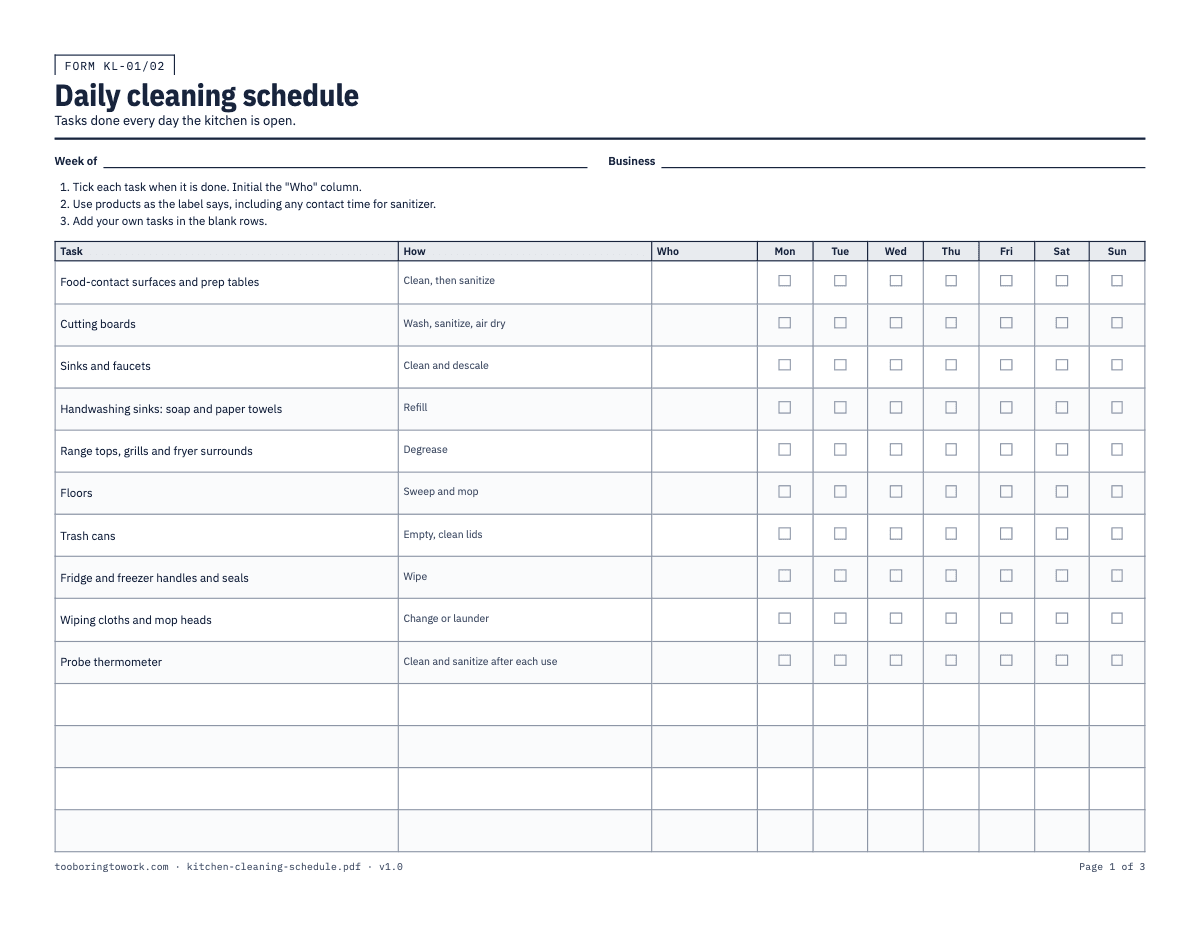
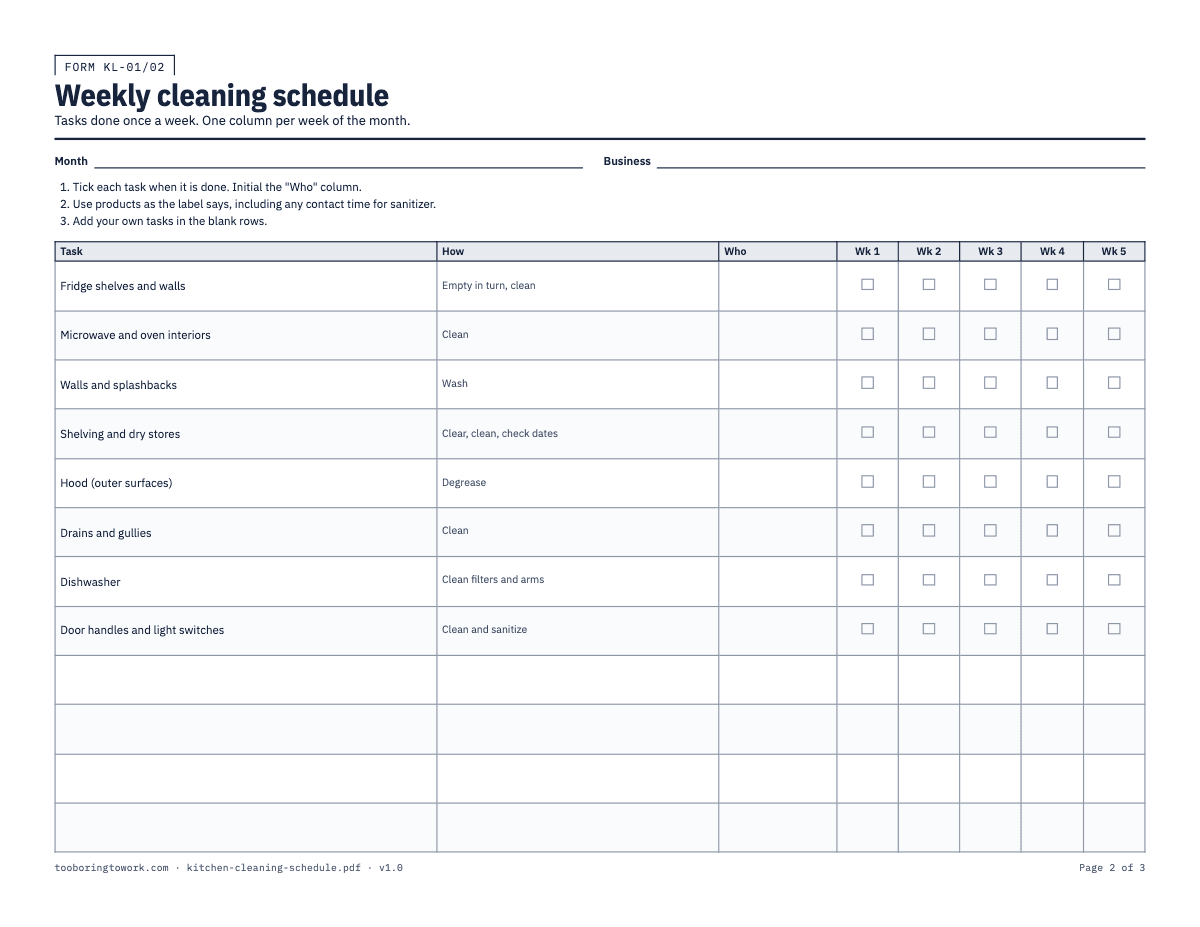
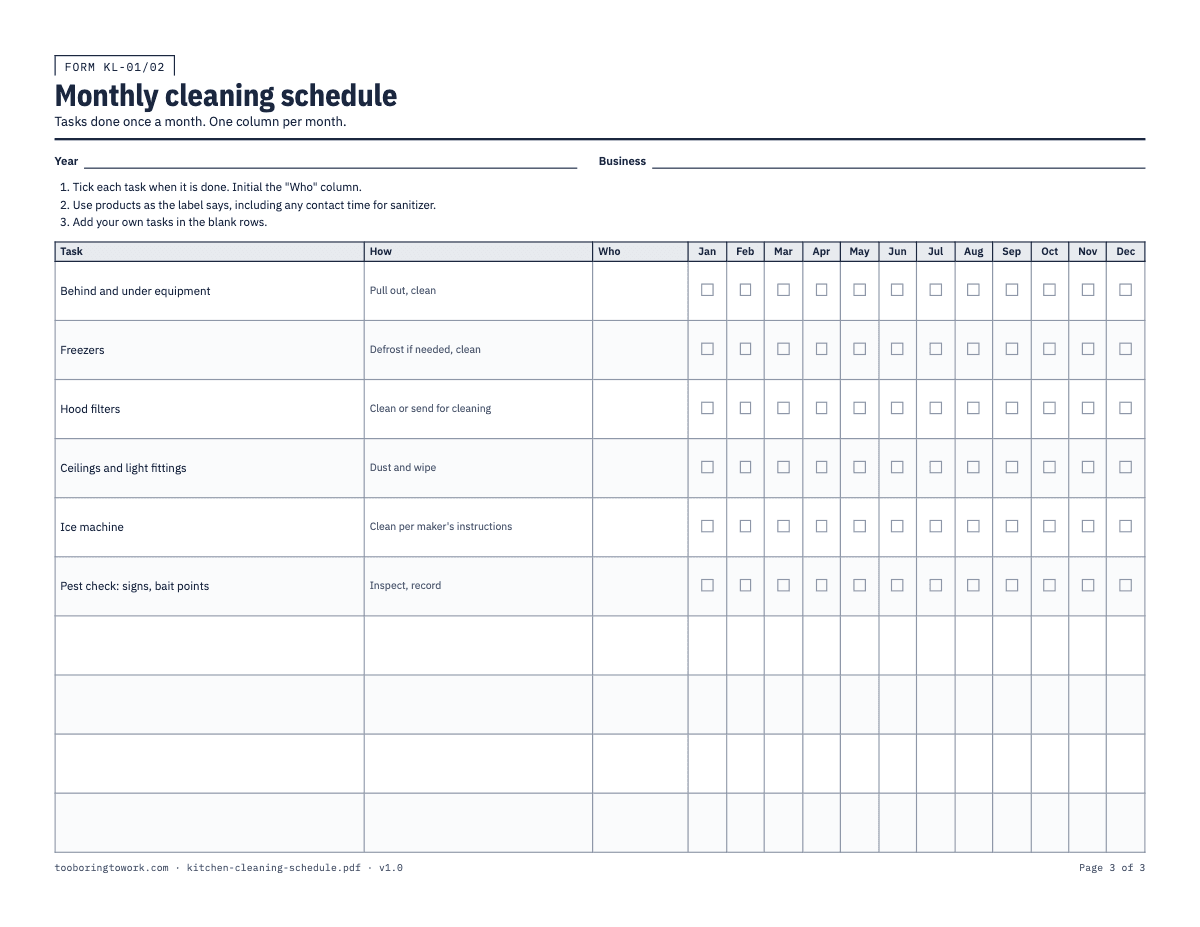
This file is three letter-size sheets. The daily sheet lists ten tasks, from food-contact surfaces and cutting boards to cloths, mop heads and the probe thermometer, with a column for each day Monday to Sunday. The weekly sheet covers fridge shelves, oven interiors, dry storage, drains, the dish machine and the high-touch spots like door handles, with one column per week of the month. The monthly sheet has a column for each month of the year and holds the jobs that need equipment pulled out or a ladder: behind and under the line, freezer defrosting, hood filters, light fittings, the ice machine and a pest check. Each task has a How column so there is no argument about what "clean the drains" means, a Who column, and blank rows at the bottom for the jobs specific to your kitchen.
The Excel version has the same three lists on Daily, Weekly and Monthly tabs. Instead of tick boxes, each cell has a dropdown with ✓, ✗ or N/A, and a Done % column at the end of every row works out how much of that task actually got done. Anything under 100% turns amber, so a manager scanning the tab on Monday morning can see which job slipped without reading every cell. It opens in Google Sheets, Numbers and LibreOffice as well.
How to fill it in
- Print the daily sheet every week, the weekly sheet every month and the monthly sheet once a year. Fill in "Week of", "Month" or "Year" and the business name at the top of each one.
- Go through the printed tasks before you put the sheets up. Cross out anything you do not have (no ice machine, no hood) and add your own jobs in the blank rows: the slicer, the soft-serve machine, the walk-in floor, the grease trap if your staff handle it.
- Read the How column and change it where your kitchen does it differently. "Clean, then sanitize" is the minimum for prep tables. If you use a specific product, write its name in, and follow the label for dilution and contact time. Sanitizer that is wiped off after two seconds has not done much.
- Put the initials of the person responsible for each task in the Who column. On the daily sheet this is usually whoever owns that station for the week, so the closing cook knows the fryer surround is theirs.
- Tick the box for the day, week or month when the task is done, not before. If a task was skipped, leave it blank or write a short reason in the box ("hood filters: vendor visit moved to 14th"). A blank with a reason tells a better story than a tick that is not true.
- In the Excel file, pick ✓ for done, ✗ for not done and N/A where the task did not apply, such as a day the kitchen was closed. N/A is left out of the Done % calculation, so a closed Monday does not drag the week down. A blank cell is ignored too, so choose ✗ for a missed task rather than leaving it empty. Clear the ticks, or save a fresh copy, at the start of each week, month or year.
- At the end of the week, a manager looks down the daily sheet for gaps and asks about them while people still remember. Then file it. Inspectors often ask how you know cleaning gets done, and a folder of sheets in date order is the answer.
- Keep the cleaning schedule next to the opening and closing checklist. The checklist confirms the kitchen was cleaned down last night; the schedule is where the deeper jobs are tracked.
A filled-in example
| Task | How | Who | Mon | Tue | Wed | Thu | Fri |
|---|---|---|---|---|---|---|---|
| Food-contact surfaces and prep tables | Clean, then sanitize | DL | ✓ | ✓ | ✓ | ✓ | ✓ |
| Chopping boards | Wash, sanitize, air dry | DL | ✓ | ✓ | ✓ | ✓ | ✓ |
| Cooker tops, grills and fryer surrounds | Degrease | RK | ✓ | ✓ | ✓ | ✓ | ✓ |
| Floors | Sweep and mop | RK | ✓ | Missed, closed 1 am. Done Wed 7 am before prep, TM | ✓ | ✓ | ✓ |
| Cloths and mop heads | Change or launder | TM | ✓ | ✓ | ✓ | ✓ | ✓ |
Common mistakes
- Using the vendor list that came with the chemicals as the schedule. It lists what the products clean, not what your kitchen needs, and it usually skips the ice machine and the space behind the flat-top entirely.
- Ticking the whole week on Sunday night. Seven ticks in the same pen, all pressed the same way, look exactly like what they are.
- Leaving the monthly jobs without a named person. "Everyone" cleans behind the fryer, which means nobody does, and the grease builds up until someone finds a mouse trail in it.
- Wiping sanitizer on and straight off. The label gives a contact time for a reason; if staff do not know it, write it in the How column.
- Never updating the task list. A new combi oven or a second fryer should appear on the sheet the week it arrives, not at the next inspection.
What the rules say
States and local agencies adopt different editions of the FDA Food Code, so the exact rules that apply depend on your state or local health code.
Source: FDA, Adoption of the FDA Food Code by State and Territorial AgenciesBeing reviewed
Last reviewed September 29, 2026. We link to official sources; your local rules may differ, so check them.
Questions
- What should be on a restaurant kitchen cleaning checklist?
- Split it by frequency. Daily: food-contact surfaces, cutting boards, sinks, handwash stations, the line, floors, trash, cloths. Weekly: fridge interiors, ovens, dry storage, drains, the dish machine. Monthly: behind and under equipment, freezers, hood filters, ceilings and lights, the ice machine and a pest check. The sheets here start with that list and leave blank rows for the rest.
- Does the health department require a written cleaning schedule?
- It depends on where you are. States and localities adopt different Food Code editions and add their own rules, so ask your health department what they expect to see. Even where a written schedule is not required, it is the easiest way to show an inspector that the jobs they check actually get done.
- What is the difference between cleaning and sanitizing?
- Cleaning removes food, grease and dirt. Sanitizing reduces germs on a surface that is already clean. Sanitizer on a greasy board does very little, which is why the How column on this schedule says "clean, then sanitize" for food-contact surfaces. Follow the label for the concentration and contact time of whatever product you use.
- Who should sign off the cleaning schedule?
- The person who did the task ticks it and the Who column names the owner. Many kitchens also have the manager or chef initial the bottom of the sheet at the end of the week after checking for gaps. It takes a minute and it means somebody actually looked.
- How does the Done % column work in the Excel version?
- It counts the ✓ marks in the row and divides by the number of entries, leaving N/A out. A task done five days out of five shows 100%. One ✗ drops it below 100% and the cell turns amber. The formula column is locked so it cannot be typed over by accident; Review → Unprotect Sheet unlocks it, with no password.
- Can I add my own tasks?
- Yes. The printed sheets have blank rows at the bottom of each list, and in Excel you can overwrite the example tasks or type into the empty rows below them. Keep the wording specific: "degrease fryer surround and floor underneath" is harder to fudge than "clean fryer area".